This article was handwritten by me (like in the olden days).
AI agents were used for the feature image, light editing, spell-checking, research, and the development of the presented solutions.
Suddenly, an ordinary Wednesday morning took an unexpected turn for the team behind Matrix.org, a decentralized, privacy-focused, open-source alternative to Slack and Discord.
They discovered a suspicious authorized_keys2 file with an unknown SSH key on one of their servers, and it was immediately clear that they were hacked.
Remediation began immediately, and by 4 am on Friday the team could finally go to bed. The attacker had been evicted, the vulnerabilities were patched, and the core services were back online. A blog post that informed all users had also been published.
But their relief was short-lived.
Less than two hours later, at around 5 am, their website was defaced with a message from the attacker, who felt the team wasn’t being transparent enough about the breach.
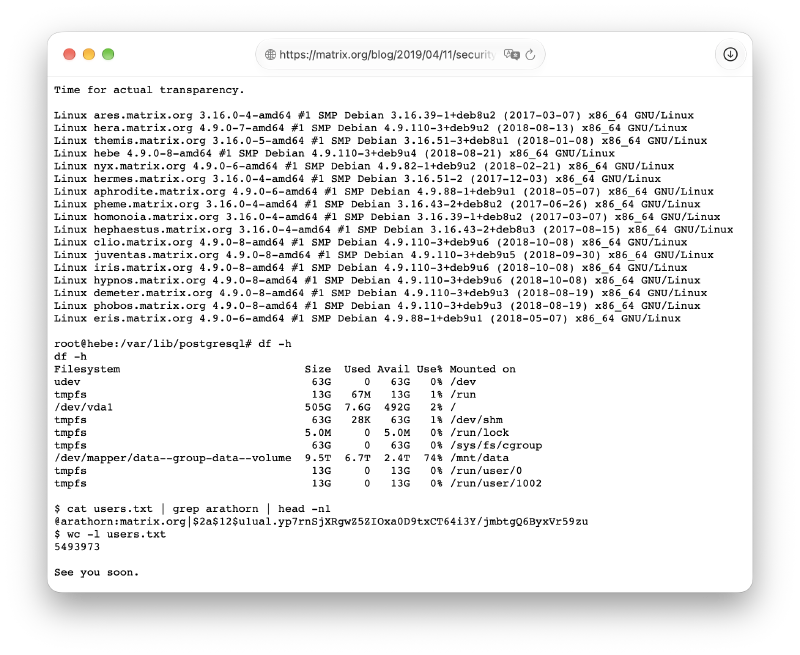
It showed they had:
- access to 17 different servers
- root on the database host with 6.7 TB of data
- and the hashed passwords of 5,493,973 users (including the co-founder)
The hacker didn’t stop there. They continued to taunt the Matrix.org team in GitHub issues.
I noticed in your blog post that you were talking about doing a postmortem and steps you need to take. As someone who is intimately familiar with your entire infrastructure, I thought I could help you out.
[...]
I would like to take a moment to thank whichever developer forwarded their agent to Flywheel. Without you, none of this would have been possible.
[...]
So, what actually happened to Matrix.org?
The attacker gained access to one of their servers through a Jenkins vulnerability and used it to expand access to Flywheel, a Jenkins build slave. They installed an SSH agent hijacking trap on it.
Three weeks later, one of the Matrix team members SSHed into Flywheel with SSH agent forwarding enabled.
This allowed the hacker’s trap script to use the developer’s SSH key to access and backdoor 15 more servers. They also added further SSH agent hijacking traps to those servers.
One day later, another developer SSHed into one of those servers with agent forwarding enabled, and the attacker gained access to two more machines.
To give credit where credit is due, the Matrix team’s eviction of the hacker had worked.
The attacker wasn’t able to regain access to the servers. Instead, they used a Cloudflare API key that hadn’t been rotated to point the website’s DNS at their defacement.
Nonetheless, SSH agent forwarding was the key reason the attacker was able to gain such widespread access, and in Matrix’s post-mortem they made their recommendation abundantly clear:
The common wisdom on this tends to be something like: “Only use agent forwarding when connecting to trusted hosts”.
[...]
As a result, several of the team doing ops work had set
Host *.matrix.org ForwardAgent: yesin their ssh client configs, thinking “well, what can we trust if not our own servers?”This was a massive, massive mistake.
If there is one lesson everyone should learn from this whole mess, it is: SSH agent forwarding is incredibly unsafe, and in general you should never use it.
My intent with this story isn’t to throw shade on the Matrix.org team. I picked this story precisely because they DID follow the common wisdom about SSH agent forwarding.
For example, the GitHub and the 1Password documentation recommend exactly that.
It’s a feature that’s enabled by default on servers, and many users simply don’t realize how it works under the hood or how it can be exploited.
However, there is good news too…
This incident occurred back in 2019, and since then SSH has added a few new features that allow you to significantly reduce the risks of SSH agent forwarding.
What you’ll learn in this article#
I’ll show you how to securely forward a single key instead of all your keys:
kim @ macbook in ~
❯ ssh-add -l | wc -l
       4

kim @ macbook in ~
❯ sshfgd example.kimhq.net
Agent pid 24963
256 SHA256:ppJE5MYFyp8rdAWpy2I9SyY/atahKZ0jntTS/X+Tn9s kim_git_dotfiles_ro (ED25519)

sysuser @ example.kimhq.net in ~
🔑 1 ❯ ssh-add -l
256 SHA256:ppJE5MYFyp8rdAWpy2I9SyY/atahKZ0jntTS/X+Tn9s kim_git_dotfiles_ro (ED25519)

sysuser @ example.kimhq.net in ~
🔑 1 ❯ ssh -T [email protected]
Hi infused-kim! You've successfully authenticated, but GitHub does not provide shell access.

sysuser @ example.kimhq.net in ~
🔑 1 ❯ ssh localhost
sysuser@localhost: Permission denied (publickey).
Notice how…
- The first
ssh-add -lcommand shows that I had 4 keys added to my SSH agent locally - I used the
sshfgdalias to forward a single key that gives only read access to my dotfiles repo - The second
ssh-add -lcommand on the remote server confirms that only that one key was forwarded - The shell prompt’s
🔑 1is a reminder that this SSH session has key forwarding enabled - The forwarded key can be used to access GitHub (without storing credentials on the remote server)
- But it can’t be used to authenticate against
example.kimhq.netor other hosts
This method has been possible since 2020, but I couldn’t find any articles that describe the full workflow. AI agents don’t seem to be aware of it either.
That’s the main reason why I decided to publish this post.
But before I show you how to set this up, allow me to explain how SSH agent forwarding works, why it’s so dangerous, and the basic steps to secure it.
If you are already familiar with this, you can skip ahead to the solution in the How to filter which keys are forwarded section.
How SSH agent forwarding works#
SSH agent forwarding can be enabled by using the -A flag when connecting to a remote server or by using the ForwardAgent option in your ~/.ssh/config file.
Here is an example:
kim @ macbook in ~
❯ ssh example.kimhq.net -A

sysuser @ example.kimhq.net in ~
❯ ssh-add -l
256 SHA256:jU+wUYvB3AIymRtt8GY/NZ+wCgNG6hBSLT4qkHnRLWk kim_ssh_personal (ED25519)
256 SHA256:lWWtkE8008v+zGj9KVL5pjk9l7lKWDS34JpvXbH50Es kim_git_dotfiles_rw (ED25519)
256 SHA256:ppJE5MYFyp8rdAWpy2I9SyY/atahKZ0jntTS/X+Tn9s kim_git_dotfiles_ro (ED25519)
256 SHA256:o/E/+8RXGBsRE/ZuJqIWsp0oIj8/JPKUYaYuRqpRNU4 kim_git_rw (ED25519)

sysuser @ example.kimhq.net in ~
❯ echo $SSH_AUTH_SOCK
/tmp/ssh-mmXYs67jr1/agent.871245

sysuser @ example.kimhq.net in ~
❯ ssh -T [email protected]

Hi infused-kim/dotfiles! You've successfully authenticated, but GitHub does not provide shell access.

⌛ took 11s⏎
I SSHed into example.kimhq.net and used the -A flag to forward my SSH agent.
None of my private keys were stored on example.kimhq.net, but ssh-add -l showed that I could still use them.
That’s because SSH created a tunnel that forwarded my local SSH agent Unix socket to the remote server at /tmp/ssh-mmXYs67jr1/agent.871245.
This allows the ssh command to use the keys on the remote server. It means you can use git with SSH auth or ssh into other servers just like you would locally.
The example above demonstrates this by SSHing into [email protected].
Once you disconnect from the remote server, the socket is removed, and your keys can no longer be used.
This is super convenient, but it also comes with significant risks.
Why it’s so dangerous#
Risk #1: You are NOT the only one who can use the forwarded socket#
What a lot of people don’t realize is that the forwarded SSH agent socket isn’t protected or scoped to your SSH session. It can be used by ANY process that runs as root or the same user as you.
On top of that…
Risk #2: SSH forwards ALL of your keys#
SSH doesn’t only forward the key you used to authenticate to the remote server. It forwards all of your keys.
Let’s say you practice good security hygiene and have separate keys for your personal and work use. That’s a great practice, but it makes no difference in this scenario because SSH forwards all of your keys.
IMPORTANT
SSH agent forwarding does NOT store your private keys on the remote server and does NOT allow an attacker to extract them.
However, it does allow a privileged attacker to use ALL your keys while your SSH session is active and the socket is forwarded.
Why people still use it#
As you can see, that’s extremely dangerous, but why is it used so widely then?
Well, it’s also extremely convenient. And in some situations it can be more secure because you don’t have to store your keys on the remote server.
Use Case #1: Access internal servers through bastions or jump hosts#
One of the most common use cases is to access internal servers through bastions or jump hosts.
A company might decide that most of its servers should not be accessible from the internet to reduce the risk of a data breach.
Instead, only one dedicated jump host is exposed; users SSH into it and from there SSH into internal servers using SSH agent forwarding.
Spoiler Alert: You don’t actually need forwarding for this. More below.
Use Case #2: Use git without storing credentials on remote servers (my use case)#
Another common use case is to use git with SSH auth and without storing credentials on the remote server.
This is my main use case for SSH agent forwarding.
I manage my terminal environment through mise and chezmoi. Mise handles the installation of all my terminal tools (like rg, bat, fzf, etc.), and chezmoi handles the sync of my dotfiles.
This allows me to have the exact same terminal environment across all my devices and servers.
However, since my dotfiles are synced through a private git repo, I need a way to clone, pull, and sometimes even push the repo on remote servers.
And some of those remote servers are very untrusted. They are not under my root control and have a high risk of being compromised (especially now in 2026 with all the remote code execution and local root exploits coming out).
A read-only deploy key would work, but sometimes I do need write access. On top of that, the key would sit on an untrusted server permanently. I wanted the key available only while I’m actually using it.
Basic tips to secure your SSH agent forwarding#
Before I show you how to filter the keys that are forwarded, let’s secure your config and learn how to avoid SSH agent forwarding for jump hosts.
1. Disable automatic agent forwarding#
The most important takeaway from the Matrix.org incident is that you should NEVER enable automatic agent forwarding. It should always be a conscious decision, used for a short period of time and only for the specific task you need to achieve with it.
So, audit your ~/.ssh/config and any files it might Include right now! Look for the ForwardAgent option and remove it or set it to no for all hosts.
# WRONG: Enables automatic agent forwarding for all hosts
Host *
    ForwardAgent yes

# WRONG: Enables automatic agent forwarding for all subdomains
# of some-host.com
Host *.some-host.com
    ForwardAgent yes

# WRONG: Enables automatic agent forwarding for apps.some-host.com
Host apps.some-host.com
    ForwardAgent yes
Instead, explicitly use the -A flag or the aliases that I’ll show you later.
2. Use ProxyJump for bastions or jump hosts#
The next rule is to never use SSH agent forwarding for bastions or jump hosts.
It’s not necessary to SSH into one host and then start another ssh command to connect to another host.
Instead, use the ProxyJump option:
ssh -J bastion.example.com internal.example.comThis will first authenticate you with bastion.example.com to create a tunnel to internal.example.com, which you then authenticate with directly. Your SSH agent is not forwarded to bastion.example.com at all, and all authentication is handled locally.
You can also configure this in your ~/.ssh/config:
Host internal-server
  Hostname internal.example.com
  ProxyJump bastion.example.com
  User sysuser
3. Consider disabling agent forwarding server-side#
You can also disable agent forwarding server-side.
However, keep in mind that this only prevents the user from using the ssh -A option. A user could still bypass this restriction if they really wanted to by manually forwarding the Unix socket.
To disable it, edit /etc/ssh/sshd_config and set AllowAgentForwarding no and then:
# Test the configuration
sudo sshd -t

# Restart the SSH server
sudo systemctl restart sshd  # or `ssh`, depending on the distribution
How to filter which keys are forwarded#
With all of this out of the way, let’s finally get to the main topic: How to secure your keys when you DO need to use SSH agent forwarding (such as for git auth).
The core idea
We can create multiple SSH keys that give access to different resources and then only forward the keys that are necessary to achieve the task at hand. For example, here are some of the keys I have:
kim_ssh_personal: My main SSH key that lets me authenticate with my personal serverskim_git_dotfiles_ro: A read-only git deploy key that lets me clone and pull the dotfiles repokim_git_dotfiles_rw: A read-write git deploy key that lets me also push to the dotfiles repokim_git_rw: A read-write key that lets me access all my repos
The solution: ssh-agent-filter
After researching a ton of options, I found a fantastic tool: ssh-agent-filter.
It does exactly what we need: It creates a proxy agent socket between our real SSH agent and what is forwarded to the remote server. Essentially, it acts like a firewall and only lets the remote server use the keys that we allow.
I almost skipped it because…
- The GitHub repo was archived
- The last commit was 10 years ago in 2016
- And it had a bunch of unanswered issues and PRs piling up
It seemed completely abandoned and unmaintained. But then I noticed that the Debian and Ubuntu packages were still being updated in 2026 by the original author.
It turned out the project wasn’t abandoned and simply moved from GitHub to a self-hosted git server: https://git.tiwe.de/ssh-agent-filter.git/about/
The tool perfectly follows the Unix philosophy of doing one thing and doing it well.
This made the audit very easy. It consists of only three C++ files and one bash script. They all do what they are supposed to do, and I didn’t find any serious issues.
So, I am completely comfortable using it.
You can install the tool with your package manager of choice:
# Debian/Ubuntu
sudo apt install ssh-agent-filter

# Homebrew (unofficial tap)
brew tap everpeace/ssh-agent-filter
brew install ssh-agent-filter
The package comes with an ssh-agent-filter binary that creates the filtered proxy and an afssh script that wraps the ssh command to start and use the filtered agent.
Let's try it in practice
We execute afssh -c kim_git_dotfiles_ro -- example.kimhq.net. It should connect to the server, and ssh-add -l should only show the kim_git_dotfiles_ro key.
We are ALMOST THERE… Drumroll, please…
kim @ macbook in ~
❯ afssh -c kim_git_dotfiles_ro -- example.kimhq.net
Agent pid 19574
256 SHA256:ppJE5MYFyp8rdAWpy2I9SyY/atahKZ0jntTS/X+Tn9s kim_git_dotfiles_ro (ED25519)

[email protected]: Permission denied (publickey).
Well, what the #@$%&?! Why do we get Permission denied (publickey), and why am I torturing you with a solution that doesn’t work?
The answer is that ssh uses the same filtered agent for both forwarding AND authentication. Since the kim_git_dotfiles_ro key only allows access to the git repo, it can’t be used to authenticate to the server.
So, to make it work, we have to include both keys:
kim @ macbook in ~
❯ afssh -c kim_git_dotfiles_ro -c kim_ssh_personal -- example.kimhq.net
Agent pid 20642
256 SHA256:jU+wUYvB3AIymRtt8GY/NZ+wCgNG6hBSLT4qkHnRLWk kim_ssh_personal (ED25519)
256 SHA256:ppJE5MYFyp8rdAWpy2I9SyY/atahKZ0jntTS/X+Tn9s kim_git_dotfiles_ro (ED25519)

sysuser @ example.kimhq.net in ~
❯ ssh-add -l
256 SHA256:jU+wUYvB3AIymRtt8GY/NZ+wCgNG6hBSLT4qkHnRLWk kim_ssh_personal (ED25519)
256 SHA256:ppJE5MYFyp8rdAWpy2I9SyY/atahKZ0jntTS/X+Tn9s kim_git_dotfiles_ro (ED25519)
Now it works, but it’s completely useless for our purpose because my main SSH key is also forwarded and could be used by the attacker to gain access to all my other servers.
How to use separate keys for forwarding and authentication
What we need is to use our…
- Regular SSH agent
→Only initial auth - Filtered agent
→Forwarding
This wasn’t possible when ssh-agent-filter was created back in 2013, but it has been possible since 2020 and OpenSSH v8.2, which added the ability to specify a socket path in the ForwardAgent option.
The afssh wrapper script hasn’t been updated to support this yet, but we can do it manually.
So, in one terminal tab, run:
kim @ macbook in ~
❯ ssh-agent-filter -c kim_git_dotfiles_ro -d
AAAAC3NzaC1lZDI1NTE5AAAAIDCApnNRl7PEamuuK4uHbiiem6JiTIp7IVyJnW38cESx
c98d24d3c561881299177c1a13ab819b
kim_ssh_personal

AAAAC3NzaC1lZDI1NTE5AAAAIDM6I4/b6encMeLf34gCgnsUzpciEdBVfDDJEXeseef7
20e10c5be6eb4ce7dcefa502bb4d1ed9
kim_git_dotfiles_rw

AAAAC3NzaC1lZDI1NTE5AAAAIPHu8r2r7GzVLMkEtF+USuMpX/xqUYMB6PnZNokkVUxz
62aa4e31accf3ab07439b1c0344e56f3
kim_git_dotfiles_ro
key allowed by matching comment

AAAAC3NzaC1lZDI1NTE5AAAAIGhqI9lN/gxDc5SJfnzVs//K1lFJwa67B8fzEJgKroT5
b72be464755d79eed2396dd1f0164a33
kim_git_rw

copy this to another terminal:
SSH_AUTH_SOCK='/Users/Kim/agent.22468'; export SSH_AUTH_SOCK;
And then in another terminal tab, run:
kim @ macbook in ~
❯ ssh -o 'ForwardAgent=/Users/Kim/agent.22468' example.kimhq.net

sysuser @ example.kimhq.net in ~
❯ ssh-add -l
256 SHA256:ppJE5MYFyp8rdAWpy2I9SyY/atahKZ0jntTS/X+Tn9s kim_git_dotfiles_ro (ED25519)

sysuser @ example.kimhq.net in ~
❯ chezmoi update
Already up to date.
Success! I used my privileged kim_ssh_personal key to authenticate with the server, but only the kim_git_dotfiles_ro key was forwarded to the server. And I was able to update my dotfiles through git with it.
Let's simplify it with a script and aliases
I have contacted the author of ssh-agent-filter to add native support for this, but in the meantime, here is a modified version of afssh that adds a --separate-identity-agent option for this workflow.
Download the script here, save it as ~/.local/bin/sshf, and make it executable with chmod +x ~/.local/bin/sshf.
Next, let’s create some convenient aliases for this workflow. I use fish as my shell, and here is my config:
| |
You can convert them easily to bash or zsh. Or even better, switch to fish!
Now we can…
kim @ macbook in ~
❯ sshfgd example.kimhq.net
Agent pid 24963
256 SHA256:ppJE5MYFyp8rdAWpy2I9SyY/atahKZ0jntTS/X+Tn9s kim_git_dotfiles_ro (ED25519)

sysuser @ example.kimhq.net in ~
❯ ssh-add -l
256 SHA256:ppJE5MYFyp8rdAWpy2I9SyY/atahKZ0jntTS/X+Tn9s kim_git_dotfiles_ro (ED25519)
Success!
And if we need write access to the repo, we can use the sshfgdrw alias.
Easy, secure AND convenient.
Just make sure to be very mindful when you use the forwarding aliases and only forward the access that is necessary to achieve the task at hand.
Alternatives that were rejected
Before I close this article, I also want to briefly go over some of the commonly recommended alternatives and why I found them to be insufficient.
1Password SSH agent
I use the 1Password SSH agent. It’s fantastic because it protects my SSH keys from being stored on the filesystem and gives more granular access approval.
But it can’t distinguish whether a key is used for local or forwarded authentication.
It does request separate approvals for each key, and you can configure it to ask for approval on every use, but it can lead to approval fatigue and is not very convenient.
SSH agent destination constraints
This is another feature that was introduced in OpenSSH 8.9 in 2022. It allows you to whitelist which destinations a key can be used with.
Here is how OpenSSH describes it in their documentation:
These extensions allow the user to add destination constraints to keys they add to a ssh-agent and have ssh enforce them. For example, this command:
$ ssh-add -h "[email protected]" \
          -h "scylla.example.org" \
          -h "scylla.example.org>[email protected]" \
          ~/.ssh/id_ed25519
Adds a key that can only be used for authentication in the following circumstances:
- From the origin host to scylla.example.org as any user.
- From the origin host to cetus.example.org as user perseus.
- Through scylla.example.org to host charybdis.example.org as user medea.
You can also use wildcards to create rules, but…
- All host keys must be in
known_hostsat the time you add the key. - OpenSSH 8.9+ is needed on the remote client and server for forwarded use.
- It needs an agent that supports constraints, and 1Password’s SSH agent doesn’t.
So, for all of these reasons, I prefer to use ssh-agent-filter instead.
Run separate SSH agents for local and forwarded traffic
This used to be the go-to advice for this use case, but you have to manage two agents and remember which keys go where.
On the other hand, ssh-agent-filter is simpler and allows you to easily select which keys are forwarded.
Other scripts and tools
There are a few other scripts and solutions in this space, but ssh-agent-filter was the best one for my needs.
I am including these in case you have different needs or preferences:
Bonus: Show in your shell prompt when your agent is forwarding#
It’s easy to open an SSH session with forwarding enabled and then forget about it.
So, I added this to my shell prompt:
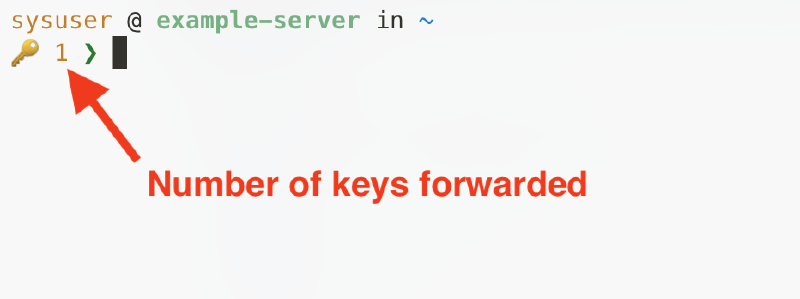
I use the starship prompt, and the following config makes it possible.
However, keep in mind that this config must be applied on the remote server for it to work. So, that’s another reason to sync your terminal environment through something like mise and chezmoi.
| |
Conclusion#
SSH agent forwarding is a powerful feature, but it’s easy to misuse.
And it’s no surprise. After all, it’s S-S-freaking-H! So, it must be secure, right? Right!?
Unfortunately, wrong. Just ask the Matrix.org team.
But now you know how to use it securely:
- Disable automatic agent forwarding
- Use ProxyJump for jump hosts
- Forward only the keys you need to achieve a specific task
- Close your SSH sessions with forwarding as soon as the task is achieved
Have a better approach or found a hole in mine? Let me know.